


Droid Dashcam - Video Recorder
4.3821.00 Reviews
App Specs
- Version
- 1.1.37
- Updated On
- License
- Free
- Downloads
- 1,000,000+
- Developer
- DroidCoolApps
- Categories
- Auto & Vehicles
- Platform
- Android, iOS
Screenshots
 Analysis by AppCompare
If you've ever found yourself needing a reliable dashcam app for your daily commutes or adventurous road trips, then Droid Dashcam might just be your new best friend. I've been trying out this app, and it's packed with some pretty nifty features that make it a strong contender in the dashcam app world.
As a free app in the Auto & Vehicles category, Droid Dashcam is made by DroidCoolApps and is rated for Everyone. It has an average rating of 4.4 from around 19,000 ratings, with over 1 million installs, so it has clearly found an audience among drivers who want to use a phone they already own rather than buy a separate camera. The current version is 1.1.14, and it runs on Android 7.0 or later. Optional in-app purchases range from $0.99 to $7.99 per item.
Features Galore: What Droid Dashcam Offers
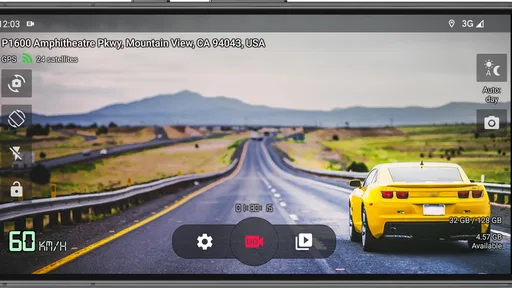
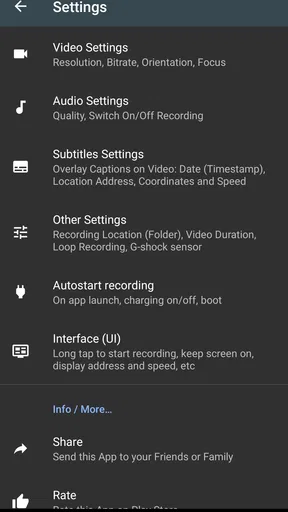
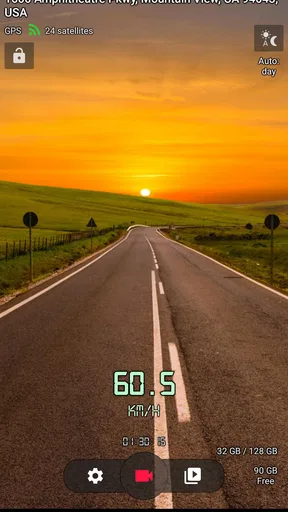
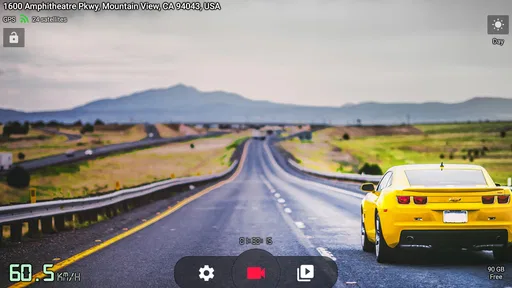
First things first, let’s talk about the user interface. It’s clean and straightforward—exactly what you need when you're focusing on the road. Even if you’re not particularly tech-savvy, you’ll find it easy to navigate through the app’s menu. Setting up the app was a breeze; you don’t need a degree in rocket science to get this thing going.
That straightforward setup matters most when you do it before a trip, not while parked at a traffic light. I’d treat the first run as a short preparation session: choose your recording options, decide where clips should be saved, and check that the phone is positioned securely with the camera’s view clear. The controls may be approachable, but changing settings while driving is still a distraction. Once the app is ready, the aim is to let it do its job without needing your attention.
One of my favorite features is the ability to record videos in the background while using other apps. This means you can still use your phone for GPS or music without interrupting your recordings. And trust me, this can be a lifesaver when you're trying to jam out to your playlist while capturing that scenic route.
For a practical commute, I’d start navigation, confirm recording is underway, and then leave the screen alone. That workflow makes the background option more than a convenience: it lets the phone serve as a recorder while its display is being used for a separate task. It is also worth testing the exact combination of apps and phone setup while stationary before relying on it for a long drive, since every driver’s device habits and mount placement are different.
The video quality is another highlight. You can record in Full HD, and the clarity is impressive. Whether it's day or night, the videos are sharp and detailed. It’s like having a pair of eagle eyes on the road with you. The app also allows you to adjust the video resolution and the frame rate, giving you control over the quality and size of your recordings.
Worth Reading Before You Choose

Flipboard Shows What News Apps Must Do Beyond the Feed

Switching to Android Auto Means Rethinking Your Driving Routine

Google Calendar Makes a Crowded Week Easier to Manage

Ludo King Makes the Most of the Minutes Between Plans

Baby Panda World Brings Quick Play to Modern Phones, but Its Game Library Feels Busy

ESPN’s Live Game View Makes Following Close Games Easier
Those quality controls create a useful trade-off rather than a single best setting for everyone. Higher-detail footage can be helpful when you want to inspect a road event, but larger files make storage management more important. If the phone is older or has limited free space, I’d try a lower setting first and review a sample clip before committing to a full journey. A dashcam is only useful if the recording is actually saved and easy to retrieve.
Customization and Control
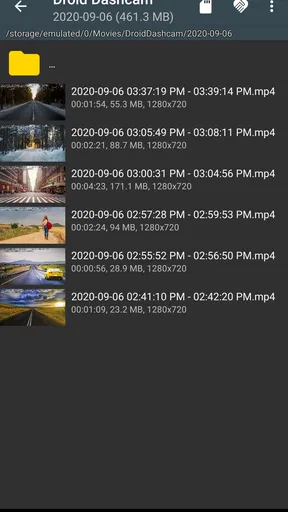
Droid Dashcam offers a plethora of customization options. From setting the video duration to choosing the storage location, you can tailor the app to fit your needs. One particularly handy feature is the loop recording. This means that once your storage is full, the app will automatically overwrite the oldest videos, ensuring that you never run out of space. It’s a smart way to maintain a continuous recording without constantly checking your storage.
Loop recording is convenient for routine driving, but it changes how I would handle an important clip: don’t assume a noteworthy moment will remain available indefinitely. Make a habit of checking how footage is stored and preserving anything you may need before continued recording cycles through older material. That small after-drive check is more dependable than waiting until an incident to learn how the app’s storage choices fit your phone.
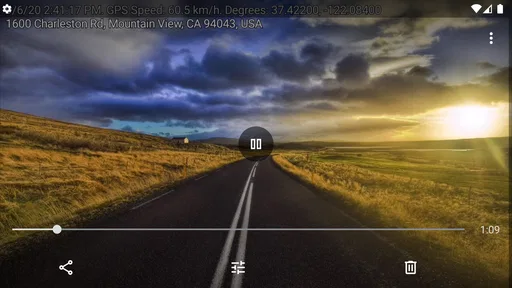
You can also enable audio recording, which can be quite useful if you want to capture conversations or just the ambient sounds. Plus, the app allows you to add a timestamp and GPS location overlay on your videos. This can be crucial if you ever need the footage for legal or insurance purposes.
These options also let drivers choose what they are comfortable keeping in a recording. Audio may capture more context, but it can also capture private conversations, so I’d decide whether it is needed before setting off rather than leave it on by habit. A timestamp and location can make a clip easier to understand later, yet I’d still treat footage as supporting material and check local rules and the requirements of whoever may need to review it.
Performance on the Road
While using the app on a recent road trip, I found that it performed smoothly without any hiccups. The app didn’t crash or freeze, which is always a good sign of a well-developed application. Battery consumption was reasonable, but as with any app that uses GPS and video recording, it can be a bit of a power hog. It's best used with a car charger plugged in.
For an everyday example, imagine a familiar commute that suddenly slows after a minor collision. With the phone already mounted, recording in the background, and the charger connected, you can keep navigation visible and avoid fumbling with the app in traffic. Once safely parked, you can review the relevant clip and decide whether it needs to be kept. That is a more realistic use than expecting the app to replace attention, safe driving, or a dedicated camera in every circumstance.
A phone dashcam also depends on the phone itself. The camera must have a clear forward view, the mount needs to stay secure, and the device needs power for a long drive. A dedicated dashcam is often the better choice for someone who wants a permanently installed recorder with no phone mount to adjust and no need to share one device between navigation and recording. Droid Dashcam makes more sense if you value using existing hardware and are willing to prepare it before each trip.
The app’s simplicity can help drivers who prefer direct menus over complicated setup, but the physical arrangement is just as important as the interface. A driver with limited reach or dexterity may find repeatedly mounting, plugging in, and positioning a phone inconvenient. I would set it up while parked and ask a passenger for help if needed; nobody should reach across the cabin or handle the screen while moving. Keeping controls and notifications out of the driver’s attention is part of using any phone-based recorder responsibly.
For sensory needs, the background recording option can be useful because it reduces the need to keep watching the app’s screen while driving. At the same time, a bright display, spoken navigation, music, and any recording alerts can compete for attention. I’d arrange the phone and sound settings before departure, then favor a calm cabin and minimal interaction. The app is not a substitute for a driver’s preferred accessibility tools or a phone setup that is comfortable to see and hear.
The app also features a parking mode, which is a fantastic addition if you want to keep an eye on your car while you’re away. It automatically starts recording if motion is detected, adding an extra layer of security to your vehicle.
Parking mode may suit someone who wants a phone to watch for activity while the car is stationary, but it is not the same as a dedicated security system. Before depending on it, I’d test the setup in a safe, ordinary parking situation and check that the phone has enough power and a useful view. If you need continuous, unattended vehicle monitoring as a primary security measure, a purpose-built dashcam or security device is a more appropriate option.
Choosing It for Your Driving Routine
I’d recommend trying Droid Dashcam if you mainly want a flexible recorder for commutes, occasional road trips, or a vehicle you do not drive every day. Its combination of background recording, adjustable video settings, loop recording, and overlays gives you room to shape how it fits your routine. It is especially appealing if carrying a separate dashcam feels like too much equipment for the amount you drive.
I would skip it if you expect a phone app to work like a fitted camera without any setup, or if you cannot safely mount and power your phone. It may also be a poor match for drivers who need a recording system that runs independently of their navigation, music, and personal phone use. In that case, spending time choosing a dedicated dashcam is likely to solve the practical problem better than asking one handset to do everything.
Compared with the usual alternatives, the main advantage here is convenience: there is no separate camera to buy or install if your phone already suits the job. The trade-off is shared hardware. Recording, navigation, calls, battery use, storage, and the camera’s position all compete for the same device. I’d judge the app less by whether it can replace every dashcam and more by whether it makes a phone-based setup reliable enough for your own driving pattern.
Final Thoughts: Is Droid Dashcam Worth It?
Overall, Droid Dashcam is a solid choice for anyone in need of a reliable and feature-rich dashcam app. Its ease of use, excellent video quality, and customizable features make it a standout option. Whether you’re a frequent traveler or just want some peace of mind on the road, this app has got you covered.
So, if you’re ready to turn your smartphone into a high-quality dashcam, give Droid Dashcam a spin. You’ll be capturing those road adventures in no time, and who knows, you might even catch something worth sharing with the world!
My inclusive verdict is that this app lowers the barrier to trying dashcam recording, especially for drivers who already use an Android phone and can prepare it comfortably before driving. Its practical value comes from fitting recording around navigation and offering controls over clips, storage, and context. The remaining barriers are real: mounting and powering the phone, managing space, and deciding how audio and location should be handled. If those trade-offs suit your circumstances, it is an approachable option; if they do not, a dedicated recorder is the clearer choice.
Pros
- User-friendly interface for easy navigation.
- High-quality video recording capabilities.
- Supports multiple video formats.
- Offers background recording option.
- Customizable storage settings.
Cons
- Consumes significant battery during use.
- Limited cloud storage options.
- Ads can be intrusive at times.
- Requires paid version for full features.
- Occasional app crashes reported.
FAQs for Droid Dashcam - Video Recorder
What features does Droid Dashcam offer for video recording?
Droid Dashcam provides a variety of features designed to enhance your video recording experience. It includes continuous recording, loop recording, and the ability to record in high definition. You can also take snapshots while recording and use GPS data to track your location. Additionally, the app offers settings for audio recording and video quality customization.
Is Droid Dashcam compatible with all Android devices?
Droid Dashcam is compatible with most Android devices running Android 5.0 and above. However, performance may vary depending on your device's specifications. It is recommended to have a device with a decent processor and sufficient storage to ensure smooth video recording and playback. Check the app's compatibility in the Google Play Store before downloading.
Does Droid Dashcam support cloud storage backup?
Currently, Droid Dashcam does not offer built-in cloud storage backup. However, users can manually transfer videos to cloud services like Google Drive or Dropbox. This requires setting up an automatic upload routine or manually backing up files to ensure your recordings are safely stored and easily accessible from any device.
How does loop recording work in Droid Dashcam?
Loop recording in Droid Dashcam allows continuous video recording by overwriting old footage when the storage limit is reached. This feature ensures you always have the latest recordings without worrying about running out of space. You can set the length of the video segments, typically ranging from 1 to 10 minutes, depending on your preference.
Is there a way to protect important videos from being overwritten?
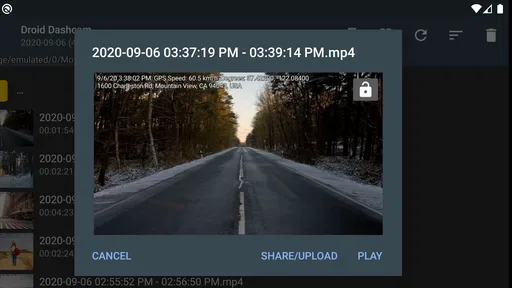
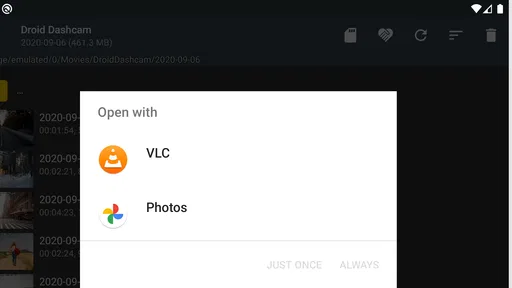
Yes, Droid Dashcam allows you to lock important videos to prevent them from being overwritten during loop recording. You can manually lock a video or set the app to automatically lock videos when it detects an impact or sudden stop, using the device's built-in sensors. This ensures critical footage is preserved for future reference.


